|
By: Paul S Cilwa |
Posted: 4/10/2026 |
|
Page Views: 21 |
| Hashtags: #RGB #HSL #HSV #HCL #ColorSpaces #ColorTheory #AccessibilityContrast #DigitalColorRepresentation |
| A guide to how computers represent, manipulate, and display colors. |
| Estimated reading time: 4 minute(s) (910 words) |
How Do Computers Represent Colors?
| Transparency |
Red |
Green |
Blue |
Computers store colors using digital representations based on color models, most commonly the RGB
(Red, Green, Blue) model. In this model, each pixel in an image is defined by three values
corresponding to the intensity of red, green, and blue light. These values are typically stored as
8-bit integers, allowing 256 levels per channel and resulting in over 16.7 million possible color
combinations in 24-bit color depth. The pixel data is stored in memory as a grid of these RGB
values, with each pixel occupying a fixed amount of space depending on the color depth and image
resolution.
When an image is rendered, the operating system or application sends the pixel data to
the graphics subsystem. This data is first processed by the CPU and then passed to the GPU
(Graphics Processing Unit), which is optimized for handling large volumes of pixel and vertex data.
The GPU interprets the pixel values, applies any necessary transformations (such as scaling,
filtering, or color correction), and prepares the final frame to be displayed. This frame is stored
in a framebuffer—a dedicated section of video memory that holds the image as it will appear
on the screen.
The graphics card then converts the digital pixel data into signals that the
monitor can understand. This involves translating the RGB values into analog voltages (in older VGA
systems) or digital signals (in modern HDMI, DisplayPort, or DVI systems). These signals are sent
through the video cable to the monitor, which uses its internal circuitry to light up the
appropriate subpixels—tiny red, green, and blue elements within each pixel on the screen. The
intensity of each subpixel is modulated to match the original RGB values, recreating the intended
color visually.
This entire process—from memory to display—happens rapidly and
continuously, typically 60 times per second or more, depending on the refresh rate of the monitor.
Advanced systems may also use color management profiles to ensure consistent color reproduction
across different devices, adjusting for variations in monitor calibration, ambient lighting, and
human perception. The result is a seamless translation of binary data into vivid, accurate color
imagery that we see on our screens.
What Other Color Spaces Are There, And Why?
Color spaces like HSL, HSV, and HCL exist because RGB—while perfect for machines—isn't
particularly friendly for humans. RGB describes colors as mixtures of red, green, and blue light,
which is ideal for storage and display but awkward when you want to think about color. If you want
to make a shade lighter, or ensure text remains readable over a background, adjusting three
interdependent RGB channels is unintuitive. This is where cylindrical color models come in. HSL and
HSV reorganize RGB into something closer to how people perceive color: a hue that maps around a
color wheel, a saturation that controls intensity, and a brightness dimension—lightness in
HSL or value in HSV—that determines how light or dark the color appears. These models were
created specifically to be more intuitive and perceptually relevant than the raw RGB cube.
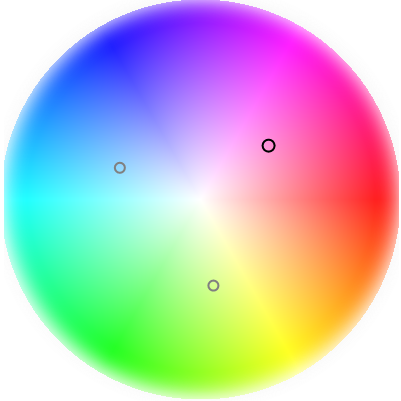
HSL and HSV are widely used in color pickers and design tools because they let you manipulate colors in
ways that feel natural. Want a lighter version of a color? Increase the lightness or value. Want a
muted tone? Reduce saturation. Designers rely on these models because they separate the what
color is it?
question (hue) from how strong is it?
and how bright is it?
—a
separation that RGB simply doesn't offer. Their structure makes them ideal for generating tints,
shades, and tones, and for building harmonious palettes where relationships between hues matter
more than raw channel values.
HCL (Hue, Chroma, Lightness), along with related perceptual models
like Lab, goes a step further by aiming for perceptual uniformity. In RGB, HSL, and HSV, equal
numeric changes don't always correspond to equal visual changes. HCL is designed so that a step of
+10 in lightness looks like the same amount of brightening no matter the hue. This makes HCL
extremely useful for accessibility tasks—such as ensuring text remains readable over a
background—because contrast can be evaluated and adjusted in a way that aligns with human
vision. It's also valuable for data visualization, where consistent perceptual differences help
prevent misleading interpretations of charts and heatmaps.
The ability to convert between these
color spaces is essential because each serves a different purpose. Images and displays ultimately
rely on RGB, so everything must end up there. But editing, palette generation, accessibility
checks, and perceptual adjustments are often far easier in HSL, HSV, or HCL. A workflow might
involve selecting a hue in HSL, adjusting contrast in HCL, and finally converting back to RGB for
rendering. Without reliable conversion, designers and developers would be stuck manipulating colors
in a model that doesn't match how people actually see them. These conversions form the backbone of
modern color management, ensuring that colors remain both visually meaningful and technically
accurate across tools, devices, and contexts.