|
By: Paul S Cilwa |
Posted: 4/17/2009 |
|
Page Views: 4,736 |
| Hashtags: #Photography |
| All about the cool things I can do with my new digital camera. |
| Estimated reading time: 2 minute(s) (410 words) |
The Color Swap feature does exactly what it claims: It allows you to replace
any particular color in a scene, with any other color (in the scene or not). I
suppose the usual purpose would be to take a commercial photo of a blue car and
have the result be of a red car. But all I could think to do to try out the
effect was to replace the blue sky with a green one.
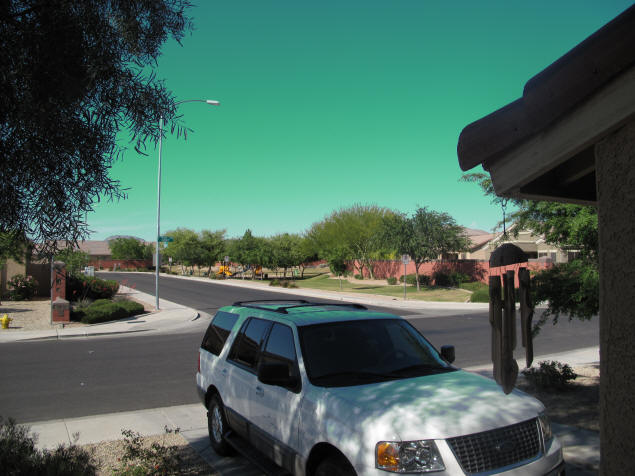
The park across from our house, if it was on a planet with a green sky. Example of Canon Powershot G10's "Color Swap" mode.
Notice the appropriateness of the reflection of the sky on the roof of my car.
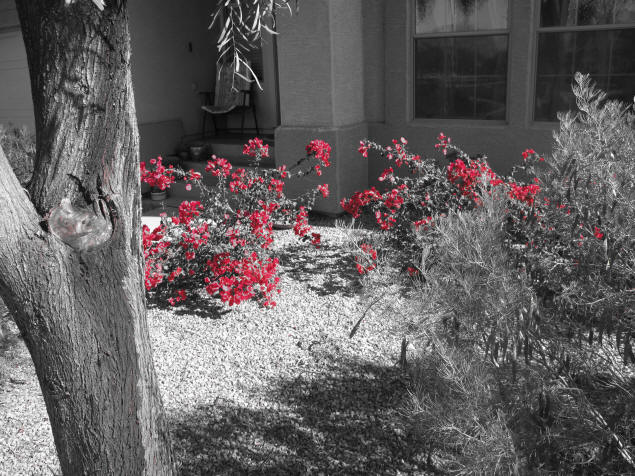
The second effect, Color Accent, might prove a little more useful. You
identify any color that appears in the scene, and the camera automatically
removes all color from anything that is not that color.
%20Frank's%20Boutonni?re.JPG)
Color Accent is a commonly-used effect these days, ever since digital photography made
it easy to accomplish. But it isn't always just one color you want to
remove, but all the color from anything but the object you want to accent. I
used the effect in a photo from my daughter
Dorothy Elizabeth's
wedding, as seen at left. I wanted to emphasize the entire boutonni?re, both
the flower and the leaves. So I used a digital photo editor to "paint out" the
color everywhere else in the photo. This is a manual process and, yes, it took a
little time to accomplish.
Often, however, an artistic photographer will in fact wish to emphasize
something that is one color: lips, a flower, grass, sky. And that is where the
in-camera effect can save a lot of tedious time.
To test out the effect, I stored the color of the bougainvillea flowers in
our front yard, then told the camera to accent that color. Here's the result:
I can't imagine I'll be using these effects very often. But it's
nice to know that, if I do need them, they're there!