|
By: Paul S Cilwa |
Posted: 4/22/2026 |
|
Page Views: 477 |
| Hashtags: #Software #Images #Conversion #Photography #Tools |
| A free image conversion and cropping tool with live preview, aspect ratio presets, and support for 30+ formats. |

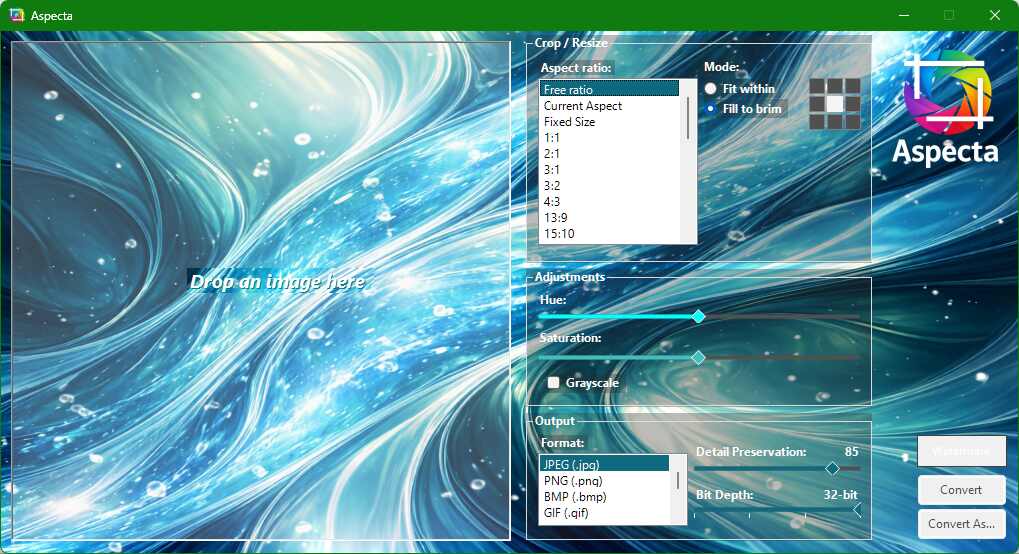
Aspecta is a free desktop image conversion and cropping tool
with live preview, aspect ratio presets, and support for over
30 image formats.
What It Does
Supported Formats
Aspecta can read and write JPEG, PNG, BMP, GIF, WebP, AVIF,
TIFF, TGA, ICO, JPEG 2000, and PDF. It can also read
(but not write) HEIF/HEIC, PSD, RAW camera formats, and SVG.
That covers pretty much everything you're likely to encounter,
from photos from your phone to assets from a graphic designer.
Key Features
- Live preview—every change you make is reflected
instantly in the preview pane, including crop boundaries,
color shifts, and format-specific compression.
- Aspect ratio presets—common ratios like 16:9,
4:3, and 1:1, plus fixed pixel sizes, plus social media
presets for platforms like Instagram, Facebook, and
YouTube thumbnails.
- Fit vs. Fill modes—Fit Within resizes your image to
fit entirely within the target dimensions (no pixels lost,
but the result may be smaller than the target). Fill To Brim resizes
to cover the target area completely, then crops the excess
using an orientation grid you control.
- Hue and saturation adjustment—shift colors or
desaturate to grayscale with a single checkbox.
- Quality slider—for lossy formats like JPEG and
WebP, dial in exactly the compression level you want.
- Estimated file size—updates live as you adjust
settings, so you know what you're getting before you save.
- Watermarks—add text watermarks to your converted images.
Download
If you'd like to try Aspecta, grab the installer below.
Aspecta Command Line
|
By: Paul S Cilwa |
Posted: 4/24/2026 |
|
Page Views: 110 |
| Hashtags: #Images #Photography #Automation #Software #Conversion #Tools #CommandLine |
| How to use Aspecta from the command line for batch processing, scripting, and automation. |
| Estimated reading time: 7 minute(s) (1501 words) |
Aspecta is not just a pretty face. Everything
it can do through its visual interface, it can also do from
the command line—which means you can script it, batch
it, and let your AI assistant drive it without ever opening
a window.
How Aspecta Works
|
By: Paul S Cilwa |
Posted: 3/23/2026 |
|
Page Views: 105 |
| Hashtags: #Software #Images #MagickNET #VBNET #ImageMagick #Architecture |
| A non-technical look at the technology behind Aspecta's image processing. |
| Estimated reading time: 4 minute(s) (816 words) |

A non-technical look at the technology behind Aspecta—how
it processes images, why your originals are always safe, and what
makes the live preview possible.
How to Use Aspecta
|
By: Paul S Cilwa |
Posted: 4/24/2026 |
|
Page Views: 129 |
| Hashtags: #Software #Images #Conversion #Photography #Tools #Tutorial |
| A detailed walkthrough of every panel and control in Aspecta's interface. |
| Estimated reading time: 6 minute(s) (1305 words) |

A detailed walkthrough of Aspecta's interface—every
panel, every control, and what it all does.