|
By: Paul S Cilwa |
Posted: 8/27/2026 |
|
Page Views: 183 |
| Hashtags: #Software #Music #AlbumArt #CoverArt #Images |
| A free tool that turns any photo into a album cover! |
| Estimated reading time: 4 minute(s) (886 words) |

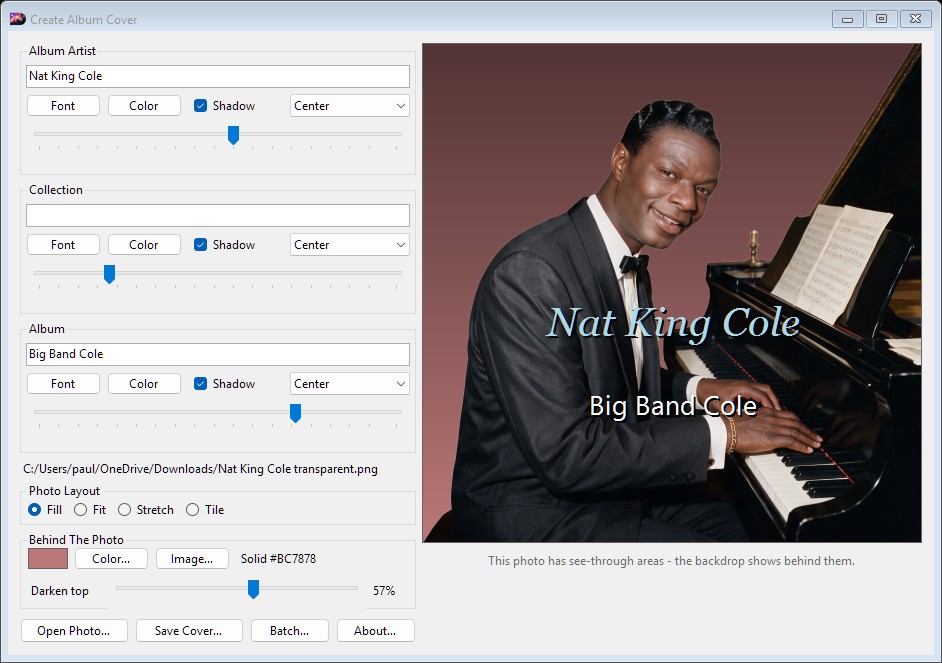
Create Album Cover is a free desktop tool that turns any photo into a
500×500 album cover, with the artist and album lettered right on it.
What It Does
Making a Cover
Open a photo. Click Open Photo, or just drag an image file onto the
window from File Explorer. JPEG, PNG, BMP and GIF all work.
Type your text. There are three lines—Album Artist,
Collection and Album. Use as many as you like; a line you leave
blank simply doesn't appear. Collection is there for box sets and series, where
the individual album belongs to something larger.
Style each line. Every line has its own Font and Color
buttons, a Shadow checkbox to help the text stand off a busy photo, and a
dropdown to align it left, center or right. The slider underneath moves that line
up and down the cover. Everything updates in the preview as you go, so you are
always looking at the real thing rather than a guess.
Save it. Click Save Cover. JPEG is offered first, since that is what
music players generally expect, but you can choose PNG instead. Whichever you pick,
the file that lands on disk is 500×500. Next time, the dialog opens on the same
drive and folder you used last, already set to the same format.

Fitting the Photo
Your photo is almost certainly not square, so Photo Layout decides what
happens to it:
- Fill—scales the photo until it covers the whole square and
crops whatever hangs over the edges. This is the usual choice, and the
default.
- Fit—scales until the entire photo is visible, leaving margins
above and below (or left and right). Nothing is lost, but you see the
backdrop around it.
- Stretch—distorts the photo to fill the square exactly. Rarely
what you want, but occasionally it is.
- Tile—repeats the photo at its original size. Good for
patterns and textures.
Behind the Photo
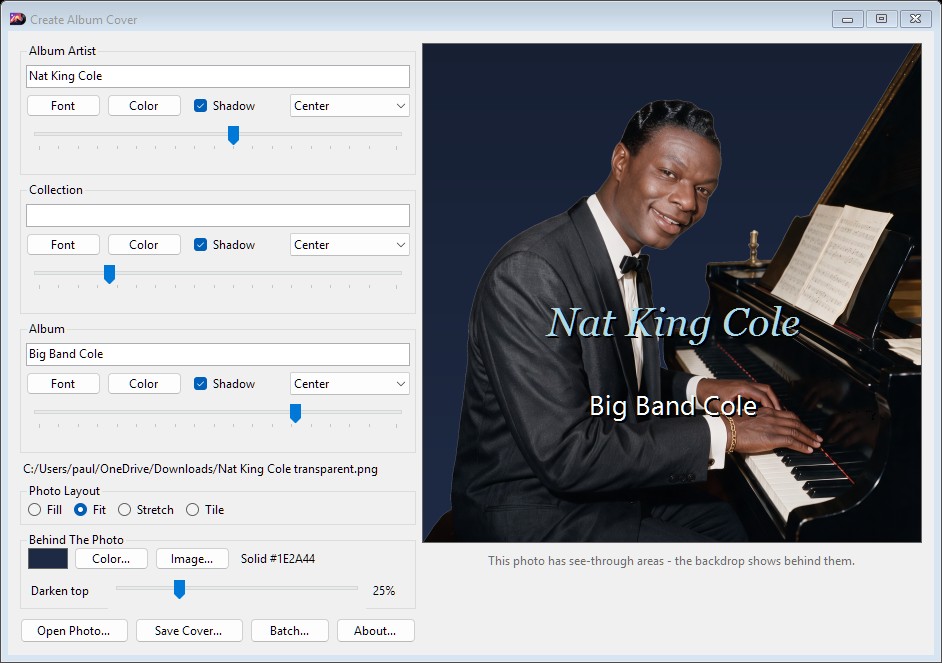
If your photo is a PNG or GIF with transparent areas—a cut-out portrait, say,
with no background—then something has to show through. That is what the
Behind The Photo panel is for. Click Color to pick a solid color, or
Image to put a second picture back there. The same backdrop also fills the
margins when you are using Fit.
Darken top lays a shadow over the backdrop, strongest at the top and fading
away toward the bottom. A little of it makes pale lettering far easier to read
without touching the photo itself.
Underneath the preview, the program tells you whether the photo you loaded actually
has any transparent areas. This is worth reading. A picture named something like
"portrait transparent.png" quite often turns out to be a flattened preview with the
checkerboard pattern painted into it, and no real transparency at all—in which
case no backdrop you choose will ever show, and the message will say so.
A Whole Shelf at Once
The Batch button works through an entire music folder. Point it at a folder
of albums and it visits each subfolder in turn, finds a picture already sitting
there, takes the artist from the parent folder's name and the album from the
subfolder's own, and writes a finished Cover.jpg inside. A leading
year, as in "1973 - Dark Side", is trimmed off the album name automatically. Any
folder with no usable picture is skipped and reported at the end.
Whatever fonts, colors and positions you have set up carry over to every cover it
makes, so a shelf of albums comes out looking like a matched set.
It Remembers
Fonts, colors, text, positions, layout, backdrop, the darkening, the folder and
format you last saved to, and even the photo you had open are all remembered
between sessions. Close the program in the middle
of something and it opens again exactly where you left it. If a photo has since
been moved or deleted, it is quietly dropped rather than complained about.
Download
If you'd like to try Create Album Cover, grab the installer below. It needs 64-bit
Windows and nothing else—everything it depends on is inside the installer,
so there is no runtime to chase down first.
Create Album Cover Command Line
|
By: Paul S Cilwa |
Posted: 8/27/2026 |
|
Page Views: 68 |
| Hashtags: #Software #Music #AlbumArt #CoverArt #CommandLine #Automation |
| How to run Create Album Cover from the command line to build covers without opening a window. |
| Estimated reading time: 5 minute(s) (1180 words) |
Create Album Cover has a command line as well as a window. Anything
you would sit and click your way through, you can also hand to a script—or to
an AI assistant—and have it done without a window ever appearing.